Jewelry Repair Software
built for Shopify-first jewelry vendors for a
one-time fee, not a forever subscription.

Stop juggling order books, WhatsApp chats, and Post-it notes. RepairDesk is purpose-built jewelry repair software that runs alongside your Shopify storefront tracking every ring resize, prong retip, and chain solder through 11 defined statuses, with the customer kept in the loop automatically over SMS, WhatsApp, and email.

One-Time Build • No Subscription
$ 2,500
paid once — not every month
Base build includes
  • 9 connected screens, fully working
  • 11-status repair workflow
  • Shopify Admin API connection
  • SMS, WhatsApp & email messaging
  • QR code labels & receipt PDFs
  • 3 user roles, 8 master data lists
+ customisation billed separately based on your specific changes itemised, transparent, capped before work begins.

If you run a Shopify jewelry brand, your repair workflow is quietly leaking money

Most mid-size jewelry vendors built a beautiful storefront, then bolted repairs on top using whatever was free or familiar. Six predictable failure points show up — every single time.

PAIN 01 Where is the customer's ring right now?

Jobs live in a paper book at the front, a goldsmith's tray at the back, and a WhatsApp thread on someone's phone. Nobody can answer the customer in under five minutes.

PAIN 02 Did we ever quote this customer? What did we say?

Quotes are spoken, scribbled, or messaged — never linked to the actual job. When the customer disputes the price at pickup, you have no record to defend.

PAIN 03 Shopify takes the payment but the workshop never sees the brief.

Shopify handles the storefront beautifully but knows nothing about prong retipping, rhodium plating, or chain length adjustments. Workshop instructions live in a parallel universe.

PAIN 04 Customers keep calling to ask if it's ready.

Without automated SMS or WhatsApp updates, your team becomes a status-update call centre. Every interruption is a sale or a workshop hour you didn't bill for.

PAIN 05 Two staff just sold the same job at two different prices.

Without a master price list and role-based access, every counter staff invents their own pricing. Margins erode silently, one repair at a time.

PAIN 06 We can't tell which repairs are actually profitable.

No service-level breakdown, no technician productivity, no overdue tracking. You're flying a workshop blind, hoping the year ends in profit.

A clear one-time fee. Plus only the customisation you actually need

No setup fees stacked on platform fees stacked on per-user charges. You pay once for the base build, and you pay for customisation — itemised, agreed in writing, capped before work starts.

CUSTOMISATION · AS NEEDED
From $ 500

Anything specific to your shop, your branding, your workflow rules, or your integrations quoted as a separate, itemised line item before any work begins.

  • Custom branding – logos, colours, fonts on all PDFs and screens
  • Importing your existing services, parts, and price lists
  • Custom statuses, return reasons, or approval workflows
  • Custom SMS / WhatsApp / email templates in your brand voice
  • Additional integrations – Xero, QuickBooks, Mailchimp, Klaviyo
  • Shopify-embedded version (runs inside your Shopify Admin sidebar)
  • Multi-store support for chains with more than one branch
  • Bespoke reports, dashboards, or staff KPIs
Quoted at a flat hourly rate. Most jewelry brands spend $500–$2,000 on customisation. Always agreed and capped before work starts.

The Case Study

Autumn & May runs every
repair through one desk,
end to end.

Client Storefront Roles Brief Build

Autumn & May — UK fine jewelry brand

Shopify (autumn-and-may.myshopify.com)

Admin · Manager · Data Entry

One source of truth for every repair, every status, every payment

RepairDesk v10.5 — bespoke, in daily production use

Why off-the-shelf didn't fit

Generic POS plugins treat a repair like a product line item. They don't understand goldsmiths, technicians, melee work, or rhodium tiers. They have no concept of "Awaiting Approval" or "Reopened". They can't print a QR ticket for a goldsmith's tray.

Autumn & May needed software shaped around how a real jewelry workshop runs — not retrofitted from a generic order management system.

What we built

A bespoke PHP application — nine connected screens, 11 repair statuses, three user roles, and direct integrations with the Shopify Admin API, Twilio for SMS, Meta WhatsApp Cloud API, and a configurable email provider.

Every repair flows through a defined pipeline. Every customer message is logged. Every payment routes through Shopify Draft Orders. Every action is auditable.

THE WORKFLOW

Every repair moves through one of four defined paths across 11 STATUSES

No more "I think it's with the goldsmith." Every job sits in exactly one status at any moment.
Status changes are logged with timestamp, user, and reason so the audit trail writes itself.

STANDARD PIPELINE · THE 80% CASE
Booked In In Workshop In Progress Polishing Completed Ready to Collect Collected

Customer is auto-notified the moment a job hits "Ready to Collect".

QUOTE BRANCH · WHEN CUSTOMER APPROVAL IS REQUIRED
Booked In Quote Sent Awaiting Approval In Workshop … continues standard pipeline

If the customer declines the quote, the job returns to "Booked In" automatically no manual reset.

REOPEN PATH · WHEN A JOB COMES BACK
Collected Reopened In Workshop … re-enters standard pipeline

Reopen reason is captured and the original job history is preserved — not overwritten.

RETURN PATH · WHEN WORK CANNOT PROCEED
Any active status Returned

Six structured return reasons: customer changed mind · not feasible · cost too high · worse condition than expected · parts unavailable · other (free text).

Inside the software

Eight connected screens. Every one earns its place.

Each screen below exists in the live Autumn & May deployment today. Screenshot placeholders
are sized for direct upload of your final UI captures.

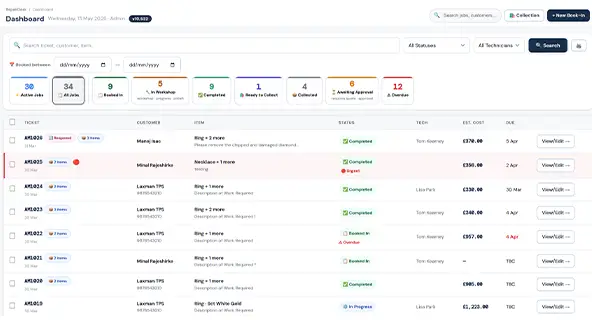
Dashboard

Screen 01 · Dashboard

Walk in, look at one screen, know exactly what your shop is doing.

The Dashboard opens to a four-tile KPI strip — In Workshop, Awaiting Approval, Ready to Collect, Overdue — each clickable to drill into the matching jobs list. Below that sits the live jobs feed with the latest activity, filtered to today by default.

  • Live counts pulled from the live repairs file
  • Overdue tile flips red the moment a due date slips
  • One-tap shortcuts to + New Book-In and Collection screen
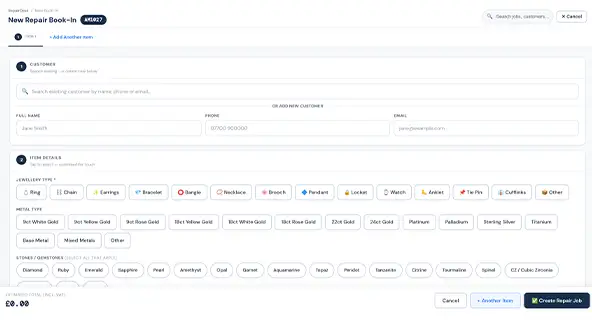
Screen 02 · New Book-In

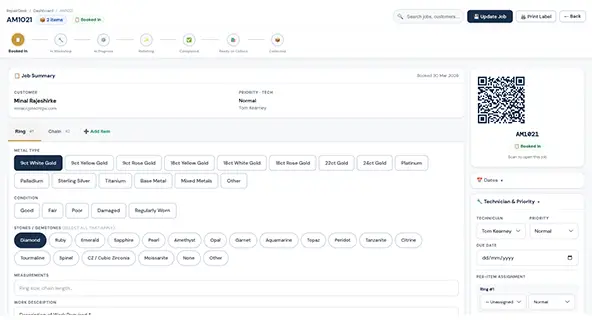
A counter assistant logs a multi-item repair without typing a price.

Six structured sections: Customer, Item, Photos, Services, Components & Parts, Charges & Due Date. Customer can be looked up locally or synced directly from your Shopify customers. Service charges and component prices auto-populate from the master price list — staff don't invent numbers, ever.

  • Multi-item support — one ticket, multiple pieces
  • Photo upload with item-level association
  • Tap-grid service selector with chip-based components & parts
  • VAT applied automatically from your Settings configuration
New Book-In
Job Detail

Screen 03 · Job Detail

Two columns. Every action on one job. Locked when it should be.

The Job Detail screen is a two-column layout: left column for item, photos, services, components, charges, and notes; right column for status controls, Send Quote, Send Update, POS payment, deposit recording, and the full Activity Log. Once a job hits Completed, Ready to Collect, or Collected, edits are locked — only safe actions remain.

  • Send Quote panel with itemised breakdown + VAT per item
  • Send Update panel with channel-aware SMS / WhatsApp / Email templates
  • POS panel for Shopify Draft Order payments + deposit + balance
  • Activity Log captures every action with timestamp and user

Screen 04 · Customers

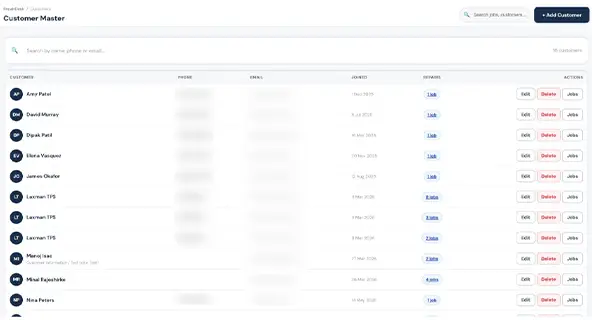
One customer record. Every repair they've ever brought in.

The Customers screen lists every customer the shop has ever served, with full repair history per customer. New customers can be added manually or imported directly from your Shopify customer base — no double entry, no mismatched contact details.

  • Full CRUD — add, edit, delete, mark inactive
  • Shopify customer import on demand
  • Per-customer repair history with totals and status counts
Customers
Masters Management

Screen 05 · Masters Management

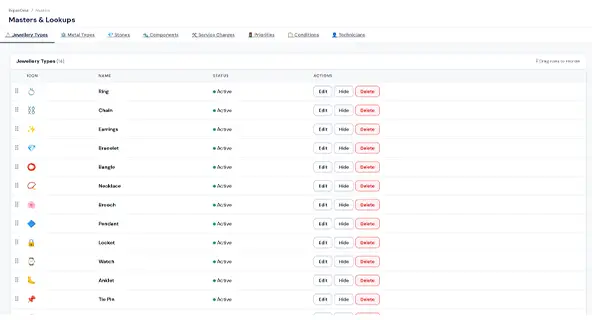
Eight master lists. The single source of truth your whole shop quotes from.

Every drop-down, tap-grid, and price field across the software pulls from the Masters screen. Edit it once, every staff sees the change instantly. Drag-and-drop reorder lets you put your most-used services at the top of the tap-grid.

  • Jewellery Types · Metal Types · Stones · Components & Parts
  • Service Charges · Priorities · Technicians · Categories
  • Add, hide, delete, reorder — Admin role only

Screen 06 · Settings & Integrations

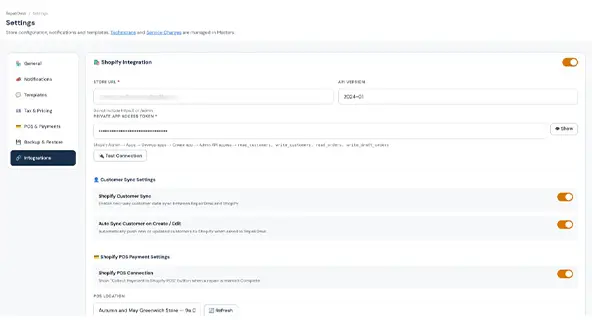
Connect Shopify, Twilio, WhatsApp and email — once.

Settings covers Store Details, Ticket Prefix, Notifications, VAT, POS, Integrations, and Backup — seven structured sections. Every integration has its own card with a "test connection" button, so you know it's working before you go live.

  • Shopify Admin API 2024-01 connection with test button
  • Twilio SMS · Meta WhatsApp Cloud API · SMTP / SendGrid / Mailgun
  • VAT rate + included-in-price toggle
  • Encrypted backup export and one-click restore
Settings & Integrations
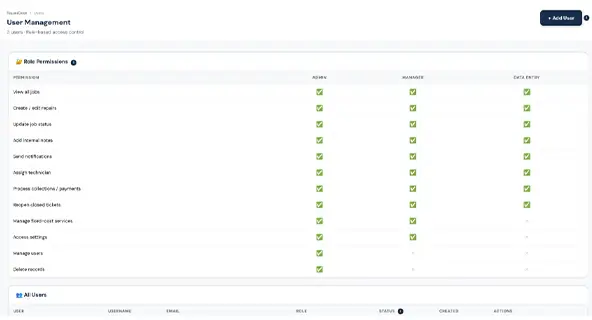
Users & Roles

Screen 07 · Users & Roles

Three roles. Each one sees only what it should.

Admin (full access), Manager (operations), and Data Entry (limited counter use) — every staff is created, deactivated, and re-roled from one screen. Role permissions are enforced server-side, so even a curious user can't peek into screens they shouldn't.

  • Add, deactivate, or change role on any staff member
  • Reset password on demand
  • Permission gating across all 9 screens and 50+ actions

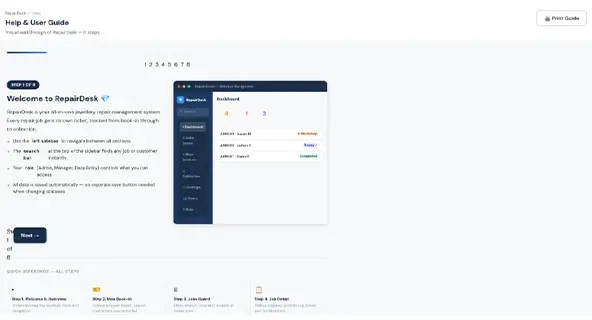
Screen 08 · Help & Reference

An in-app reference your weekend counter can actually use.

The Help screen is a structured, expandable reference that covers every status, every template variable, every workflow, and every keyboard shortcut. New staff are productive the same shift — no PDF manuals, no separate training portal.

  • Quick reference for all 11 statuses with descriptions
  • All template variables explained with examples
  • Step-by-step workflows for every common task
Help & Reference

CUSTOM BUILD

Your shop runs your way. So should your jewelry repair software

The $2,500 base build is fully working software the moment we hand it over. Customisation is everything that makes it yours — quoted separately, agreed in writing before work starts, and itemised on the invoice.

Your services and parts, your prices

We import your existing repair price list — including melee work, plating tiers, and stone-setting variations — into the Masters screen exactly as your workshop runs it.

Your messaging templates, your tone

Your logo, your fonts, your colours on every PDF (quote, invoice, receipt, job ticket) and every customer-facing message template.

Your messaging templates, your tone

SMS, WhatsApp, and email templates rewritten in your voice with your variables: ticket number, customer name, item description, due date, and total.

Your team, your roles

The three built-in roles can be fine-tuned to which screens and actions each of your staff types should and shouldn't see.

Optional Shopify-embedded version

The same software, embedded inside your Shopify Admin sidebar — your team never leaves the platform they already know.

Extra integrations

Xero, QuickBooks, Mailchimp, Klaviyo, label printers — anything with an API can be wired in as a customisation line item.

EXAMPLE QUOTE Typical Custom Build · UK Jewelry Brand

Sample itemised customisation, illustrative only.

  • Base Build (one-time)$2,500
  • Brand customisation (logo, colours, PDFs)$400
  • Import existing 60-item price list$300
  • Custom SMS & WhatsApp templates (×8)$250
  • Shopify customer + product mapping$350
  • Staff training session (2 hours, remote)$200
Project Total $4,000

Paid once. No subscription. No per-user fees. Source code & data ownership transfers to you on completion.

Next step

See your own repair workflow inside a working
jewelry repair software demo.

$2,500 one-time · plus the customisation you actually need

In 30 minutes we'll walk through your current process, show you RepairDesk live with
sample data from a Shopify jewelry brand, and quote a custom build scoped to your store.
No commitment. No template pitch.

Book My 30-Minute Walkthrough
Built for Shopify Live deployment proof Source code transferred Owner-direct support
Chat with us